iOS Simulator
The
iOS Simulator application :-
- (locatedin /Platforms/iPhoneSimulator.platform/Developer/Applications)
- Xcode
installs applications in simulation environments automatically when you build
your application for a simulator.
How
to launch Simulator:-
- Go to Finder and type iOS simulator
-
Click
on iOS simulator
Requirement
for iOS simulator:-
- Mac OS X
- Latest Mac OS
- Xcode
- Latest Xcode OS
Location
where to place the simulator build:-
How to
launch iOS simulator:-
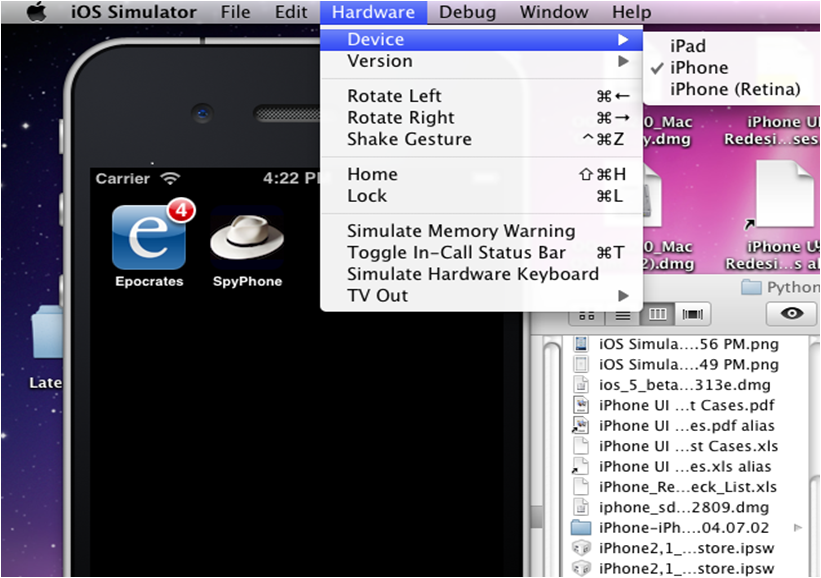
Hardware
options available for simulator:-
To specify
the device you want to simulate, choose Hardware > Device, and choose the
device.
To specify the iOS version to simulate, choose
Hardware > Version, and choose the iOS version.
Manipulating
the Hardware:-
- Rotate Left. Rotates the simulator to the
left.
- Rotate Right. Rotates the simulator to the
right.
- Shake Gesture. Shakes the simulator.
- Home. Takes the simulator to the Home screen.
- Lock. Locks the simulator.
- Toggle In-Call Status Bar. Toggles the status bar between
its normal state and its state when a phone call or FaceTime call is in
progress.
- Simulate Hardware Keyboard. Toggles the software keyboard
on an iPad simulator. Turn off the software keyboard to simulate using a
keyboard dock or wireless keyboard with an iPad device.
- TV Out. Opens a window simulating the TV out
signal of a device.
Gesture
- Desktop action:-
Tap
Click
- Touch and hold Hold down the mouse button.
- Double tap Double-click.
- Swipe
1. Place
the pointer at the place where you want the swipe to start.
2. Hold
down the mouse button.
3. Move the
pointer in the direction you want to swipe and release the mouse button.
Uninstalling
Applications:-
- Place the pointer over the icon of the application you want to uninstall
and hold down the mouse button until the icon starts to wiggle and a close
button appears.
- Click the close button.
- Click the Home button to stop the icon from
wiggling
Resetting
Content and Settings:-
- To
set the user content and settings of a simulation environment to their factory
state and remove the applications you have installed, choose iOS Simulator >
Reset Content and Settings
Viewing
iOS Simulator Console and Crash Logs:-
- If your application crashes while
running in a simulator, the CrashReporter facility displays details about the
crash.
/Applications/Utilities
Hardware
Simulation Support:-
iOS
Simulator doesn’t simulate accelerometer and camera hardware